 Storemast
Guide
What's New on the App Store: how to write release notes
By the Storemast team · Last updated
TL;DR
What's New is the release note for an App Store update. It shows on your product page and in the Updates list, up to 4,000 characters per localization. A first version has none. You write it while preparing the version, and it's locked once you submit (until a rejection or you remove the version from review). Lead with what users will notice, keep it short, write each language properly, and say thank you for bug reports.
Release notes are the last thing you write before submitting an update and the first thing many users read about it. On the App Store they're called What's New. They're short, they're public, and once you submit you can't fix a typo without pulling the version. This guide covers where they appear, the rules, and how to write notes worth reading, with templates.
Where What's New appears
- Your product page. A "What's New" section shows the latest version number, its date and the notes, with a link to the version history.
- The Updates list. In the App Store's account and updates screen, each pending or recent update shows its notes.
- Version history. Every earlier version keeps its notes, so your history is a public changelog.
Most people see only the first couple of lines, with the rest behind "more". Write as if that's all they'll read.
The rules
| Rule | Detail |
|---|---|
| Length | Up to 4,000 characters per localization |
| Per language | Each localization of the version has its own What's New |
| First version | Not available; there's nothing new yet |
| When to edit | While the version is editable: preparing, after a rejection, or after removing it from review |
| After submitting | Locked; it goes live with the version as written |
| Formatting | Plain text; line breaks work, so use short lines or simple bullets |
The lock is the one that bites. Once the version is Waiting for Review or In Review, the text can't change. If you spot a mistake before approval, you can remove the version from review, fix it and resubmit, at the cost of a new place in the queue. After release, the notes stay as they were until your next version. See every App Store version status explained.
How to edit What's New
In App Store Connect
- Open the app and the version you're preparing (for example 2.4) under the iOS app.
- Pick a language from the localization menu at the top right of the version page.
- Write the text in What's New in This Version, then save.
- Repeat for every localization the version has, then submit.
On your iPhone with Storemast
Storemast lists What's New per language for each version that's still editable. Tap a language, edit with a live character count, and save with Face ID; the change goes straight to App Store Connect. It's handy for the typo you notice on the train after you thought you'd finished.
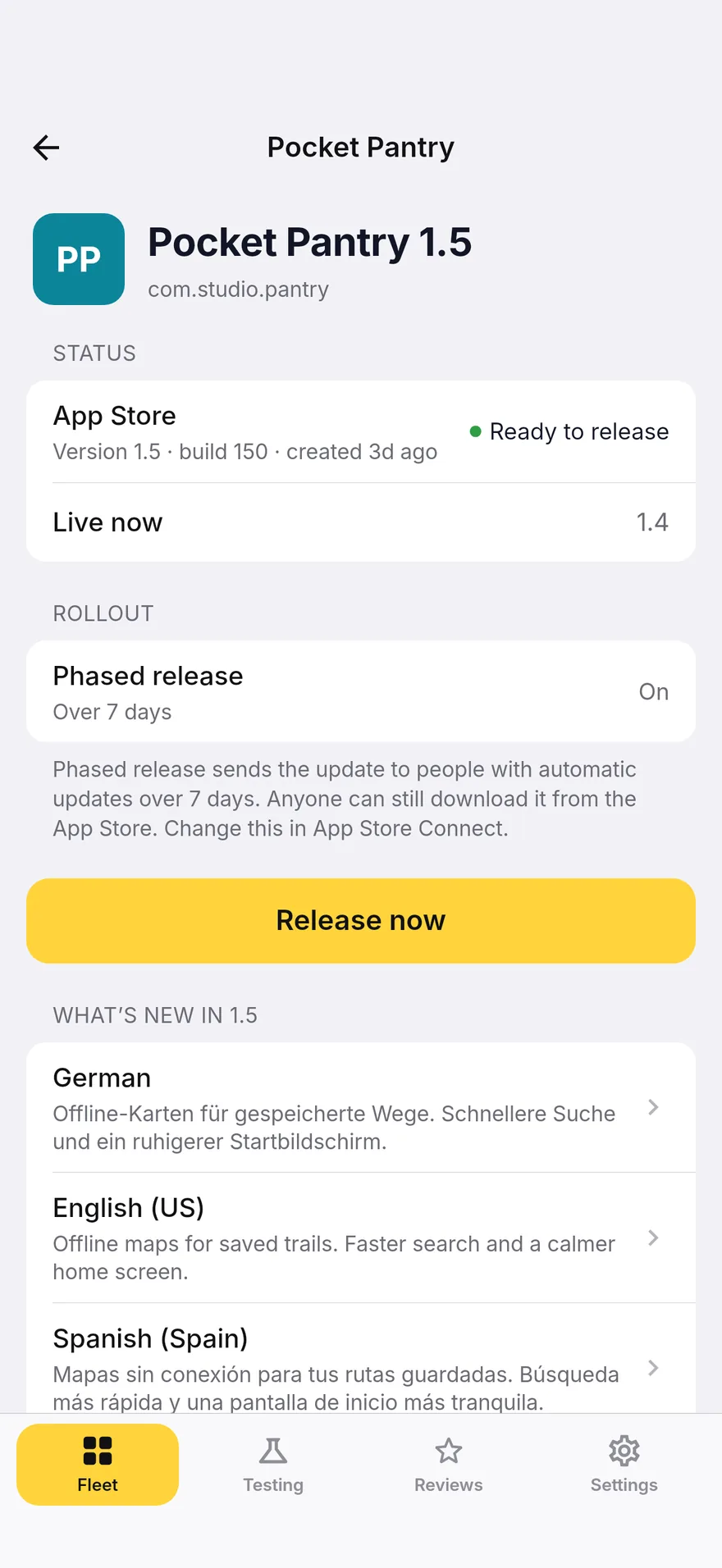
Storemast edits the languages a version already has; add new localizations in App Store Connect. More on the What's New feature.
Writing notes people read
- Lead with what users notice. A new feature, a fix to a complaint, a speed-up they'll feel. Internal refactors don't belong here.
- Use their words. "Sync now works on mobile data" beats "Improved network layer reliability".
- Be specific about fixes. "Fixed a crash when exporting long notes" tells the person who hit it that you heard them.
- Keep it short. Three to five lines is plenty for most updates.
- Don't only write "bug fixes and improvements". It's allowed, but it's a missed chance, and people who read release notes notice.
- Say thank you. If a review reported the bug, thank the people who reported it, then reply to the review once the fix is live.
- Stay accurate. Mention only what's in this version, and nothing that depends on a server change that isn't live yet.
Templates
Start from these and make them yours. Square brackets mark what to replace.
Feature update
New: [feature in one line, as a benefit].
• [Second improvement]
• [Fix people asked for]
Thanks for all the feedback. Keep it coming at [support address].
Bug-fix release
This update fixes [the problem in user words], which some of you hit after [x.y].
Sorry about that, and thank you to everyone who reported it.
Also: [small fix], [small fix].
Small update
Smoother [area], a fix for [problem] on [device or situation], and small
tweaks throughout.
Big redesign
[App] has a new look. [What's easier now] in one tap, and [second benefit].
Everything you had is still there: [where to find the main thing].
Tell us what you think at [support address].
Localising release notes
Each localization of a version gets its own What's New, and App Store Connect expects you to fill it for every language the version has. A few tips:
- Write the English last-minute, translate early. Agree the content a day before you submit so translations aren't rushed.
- Check machine translation. Release notes are short, and a clumsy sentence stands out. A native speaker reading it once is enough.
- Keep the same facts in every language. Don't promise a fix in one language and forget it in another.
- Mind length. German and French often run longer than English; another reason to keep it short.
If you manage notes in files, tools such as fastlane can upload a release_notes.txt per locale with your metadata. For everything else that changes per language, see App Store localization.
What's New compared with Google Play release notes
| App Store What's New | Google Play release notes | |
|---|---|---|
| Limit | 4,000 characters per language | 500 characters per language |
| Where you write it | On the version, per localization | On the release, per language |
| First release | None | Optional |
| After submitting | Locked until a rejection or you remove the version from review | Written with each release; the next release brings new notes |
If you ship on both, write to the shorter limit and reuse it. Details in Google Play release notes.
Questions
How long can App Store release notes be?
Up to 4,000 characters per localization. The App Store shows the first few lines and hides the rest behind 'more', so the start matters most.
Can I edit What's New after the app is released?
No. What's New belongs to the version, and once you submit it's locked. You can only change it while the version is editable, for example after a rejection or if you remove it from review before approval.
Why is there no What's New field for my first version?
A first version has nothing to compare with, so App Store Connect only asks for What's New from your first update onwards.
Do release notes need to be translated?
Each localization of the version has its own What's New. A localization you leave empty can be refused at submission, so fill every language the version has, ideally written or checked by a native speaker.
Is What's New used for App Store search?
Apple doesn't list it among the fields used for search. Write it for people, not for keywords.
Can I edit What's New from my iPhone?
Yes. Storemast lets you edit What's New for each language of a version that's still editable, with a character count, and saves it to App Store Connect after Face ID.