 Storemast
Security
How Storemast handles your App Store Connect API key
An App Store Connect team key can release apps and reply to reviews in your name, so it deserves care. Storemast's design is simple: the key never leaves your iPhone.
TL;DR
Your issuer ID, key ID and .p8 private key stay on your iPhone, with the key in the iOS Keychain. Storemast signs short-lived ES256 tokens on the device and sends requests straight to api.appstoreconnect.apple.com. There's no Storemast server or account, and every change asks for Face ID.
What you give Storemast
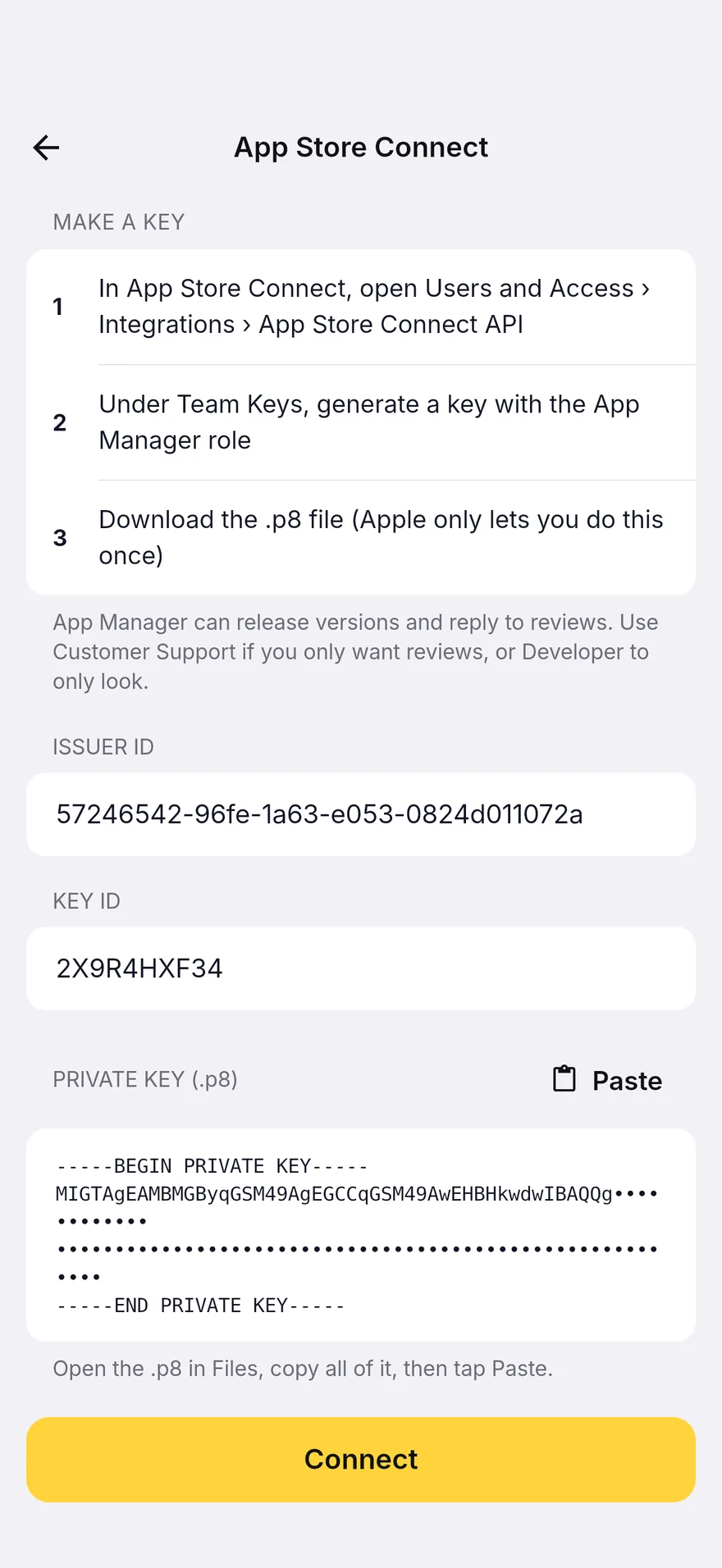
To connect, you create a team API key in App Store Connect (step-by-step guide) and enter three things:
- Issuer ID: identifies your team's API account (a UUID).
- Key ID: the 10-character ID of the key.
- Private key: the contents of the
AuthKey_XXXXXXXXXX.p8file Apple lets you download once. Open it in Files, copy all of it and tap Paste.
Before saving, Storemast checks the IDs and the key format, then lists your apps with it to prove the key works.
Where it's stored
- The private key is saved only in the iPhone's secure storage, the iOS Keychain. It isn't written to app files, logs or caches.
- The connection details (the name you give it, issuer ID, key ID and the Look only setting) are kept in the app's preferences on the phone.
- Remove key in Settings deletes it from the phone. To stop it working everywhere, revoke it in App Store Connect.
How requests are signed
App Store Connect API requests carry a JSON Web Token (JWT) signed with your private key. Storemast makes these tokens on the iPhone:
- Algorithm ES256 (ECDSA with the P-256 curve and SHA-256), the one Apple requires.
- The header names your key ID; the payload names your issuer ID, the audience
appstoreconnect-v1and an expiry. - Tokens last 15 minutes (Apple allows at most 20) and Storemast makes a fresh one before the old one runs out.
The token proves the request came from your key without sending the key itself. Only the signed token travels, over HTTPS, to Apple.
Who Storemast talks to
- Apple:
api.appstoreconnect.apple.comfor your apps, versions, builds and reviews, and Apple's image servers for app icons. - Sentry, only if crash reports are on: when the app crashes, a report with the error and the app version goes to Sentry's EU region. Before it leaves the phone it's scrubbed: UUIDs such as issuer IDs, 10-character key IDs and app IDs are masked, along with emails, tokens and other credentials. Turn it off in Settings › Send crash reports.
That's all. No analytics, no advertising SDKs, no Storemast server. Details are in the privacy policy.
Changes need you
- Face ID before every change. Releasing, pausing or completing a rollout, editing What's New and sending or deleting a reply all show what will happen and then ask for Face ID or your passcode.
- Look only mode hides those buttons on this phone, even if the key could do them. Useful on a shared device or when you only want to watch.
- The key's role sets the ceiling. Apple enforces it on every request, so a Customer Support key can't release a version whatever the app shows.
Good practice for your key
- Create a key just for Storemast, so you can revoke it without breaking your CI.
- Pick the lowest role that does what you need: App Manager to release, Customer Support for reviews only, Developer to look.
- Don't email or message the .p8 file to yourself; move it with AirDrop or the Files app and delete the copy afterwards.
- Revoke keys you no longer use. Revoking is instant and permanent.
Questions
Does Storemast ever see my API key?
No. There's no Storemast server. The .p8 key is saved in your iPhone's Keychain and only used on the phone to sign requests to Apple.
What happens if I lose my phone?
Revoke the key in App Store Connect (Users and Access › Integrations › App Store Connect API). A revoked key stops working at once, everywhere. Then create a new one for your new phone.
Can I make Storemast read-only?
Yes, two ways. Create the key with a role that can't release or reply, such as Developer, or turn on Look only for the key in Storemast's Settings, which hides every button that changes something.