 Storemast
Guide
TestFlight for developers: the complete guide
By the Storemast team · Last updated
TL;DR
TestFlight is Apple's beta testing service. Internal testers (up to 100 members of your App Store Connect team) get builds without review. External testers (up to 10,000, by email or a public link) need the first build of each version to pass TestFlight App Review. Testers install the TestFlight app, accept the invitation and send feedback with screenshots from inside your app. Every build expires after 90 days.
Before an app or an update reaches the App Store, most teams put it in front of real people with TestFlight. It's free, built into App Store Connect, and the only Apple-sanctioned way to hand a beta to thousands of people. This guide is for developers running a beta: internal and external testing, groups and public links, invitations, beta review, build expiry, feedback, and the problems that come up most.
How TestFlight works
- Upload a build to App Store Connect from Xcode, Transporter or CI. Apple processes it.
- Add it to a group of testers in the app's TestFlight section.
- Testers get an email or open a public link, install the TestFlight app from the App Store, and install your beta.
- They test and send feedback from inside your app or from TestFlight.
- You upload newer builds; testers are told about them. Each build lasts 90 days.
Beta apps are installed like normal apps (with an orange dot next to the name on the Home Screen) and replace the App Store version on that device. To go back, testers reinstall from the App Store.
Internal vs external testing
| Internal testing | External testing | |
|---|---|---|
| Who | Members of your App Store Connect team with a role that allows testing | Anyone with an email address or your public link |
| How many | Up to 100 testers (Apple's documented limit), each on several devices | Up to 10,000 testers per app (Apple's documented limit) |
| Review | None: builds are available once processed | TestFlight App Review, usually for the first build of each version |
| Invitation | Email, after they've joined your team in App Store Connect | Email or public link |
| Best for | Your team, every build, daily | Clients, customers, a public beta |
A common setup: an internal group gets every build automatically; an external group gets the builds you're happy to show outside the team.
Groups
Testers are organised into groups, and builds are given to groups, not to individual testers.
- Internal groups can get new builds automatically as soon as they finish processing.
- External groups get the builds you add. Each group can have its own public link and test information.
- Use several groups to separate audiences: Team, Clients, Public beta, or one group per feature you're testing.
TestFlight invitations
By email
Add a tester's name and email to a group. When a build is available to the group, they receive an invitation email from TestFlight. On their iPhone or iPad they:
- Install the TestFlight app from the App Store.
- Open the email on the device and tap View in TestFlight (or enter the redeem code in TestFlight).
- Tap Accept, then Install.
Internal testers first have to accept the invitation to your App Store Connect team; then they can be added to internal groups.
By public link
For an external group, turn on Public Link. You get a URL to share anywhere: your website, a newsletter, a support reply. Anyone who opens it on a device with TestFlight can join until the limit you set is reached. You can change the limit, turn the link off, and, in recent versions of App Store Connect, set criteria such as the device or OS version a tester needs. A public link only works once a build has passed TestFlight App Review.
Storemast's own beta works this way: it runs on TestFlight, by invitation for now. See how to join the Storemast beta.
TestFlight App Review for external testing
Builds for external testers go through TestFlight App Review, a check against the App Review Guidelines similar to (and usually lighter than) App Store review. Before you submit, fill in the Test Information:
- a beta app description and a feedback email,
- a marketing URL and privacy policy URL, if you have them,
- sign-in information for a demo account if the app needs one, and
- contact details and notes for the reviewer.
Usually only the first build of each version needs a full review; later builds of the same version may go straight to testers. A build waiting for this review shows Waiting for Review in TestFlight. That's separate from App Store review (see how long App Store review takes).
What to Test and build notes
Each build can have What to Test notes, shown to testers in the TestFlight app. Keep them short and specific: what's new, what you want them to try, known issues. Testers read this more than any email you send.
Build expiry: 90 days
Every TestFlight build is available for 90 days from upload. Then it expires: testers can't install it any more, and it can't be extended. The fix is always a new build with a higher build number. You can also expire a build early, for example if it has a serious bug.
The catch for long betas and multi-app teams: nobody notices until a tester says the app “stopped working”. The TestFlight build expiry guide has a routine to stay ahead.
TestFlight feedback and screenshots
TestFlight collects feedback without you building anything:
- Screenshot feedback: a tester takes a screenshot while using your beta, taps the preview, chooses Share Beta Feedback, marks it up and adds a comment.
- From TestFlight: on the app's page in the TestFlight app, testers can send feedback with an optional screenshot.
- Crash feedback: when the beta crashes, TestFlight can ask the tester to share the crash with a comment.
You'll find it all in App Store Connect under the app's TestFlight section (Feedback: screenshots and crashes), and in Xcode › Organizer › Feedback, where crash reports are symbolicated. Feedback includes the device, OS version and build, which makes it far more useful than an email saying “it crashed”.
Tips for better feedback: ask for it in your What to Test notes, tell testers that a screenshot plus one sentence is enough, and reply to the feedback email address you gave so testers feel heard.
Build statuses in TestFlight
| Status | Meaning |
|---|---|
| Processing | Apple is processing the upload. Usually minutes. |
| Missing Compliance | Answer the export compliance question about encryption. |
| Ready to Submit | Ready for internal testers; external groups need it submitted for beta review. |
| Waiting for Review / In Review | In TestFlight App Review for external testing. |
| Testing | Available to the groups it was added to. |
| Expired | Past 90 days, or expired by you. |
Labels vary slightly between App Store Connect, the API and the TestFlight app, but the stages are the same.
Common TestFlight problems
- The build doesn't show up. It's still processing, or it's waiting on export compliance. Check your email from Apple for processing errors.
- Testers can't see the new build. It hasn't been added to their group, or it's waiting for beta review.
- “This beta is full” or “isn't accepting new testers”. The public link has reached its limit or been turned off, or no build is currently available.
- The invitation never arrived. Check the address and spam folder, resend from App Store Connect, or send a public link instead.
- “The app stopped working.” The build expired. Upload a new one.
- A tester wants the App Store version back. Delete the beta and install from the App Store, or stop testing in TestFlight.
TestFlight across several apps
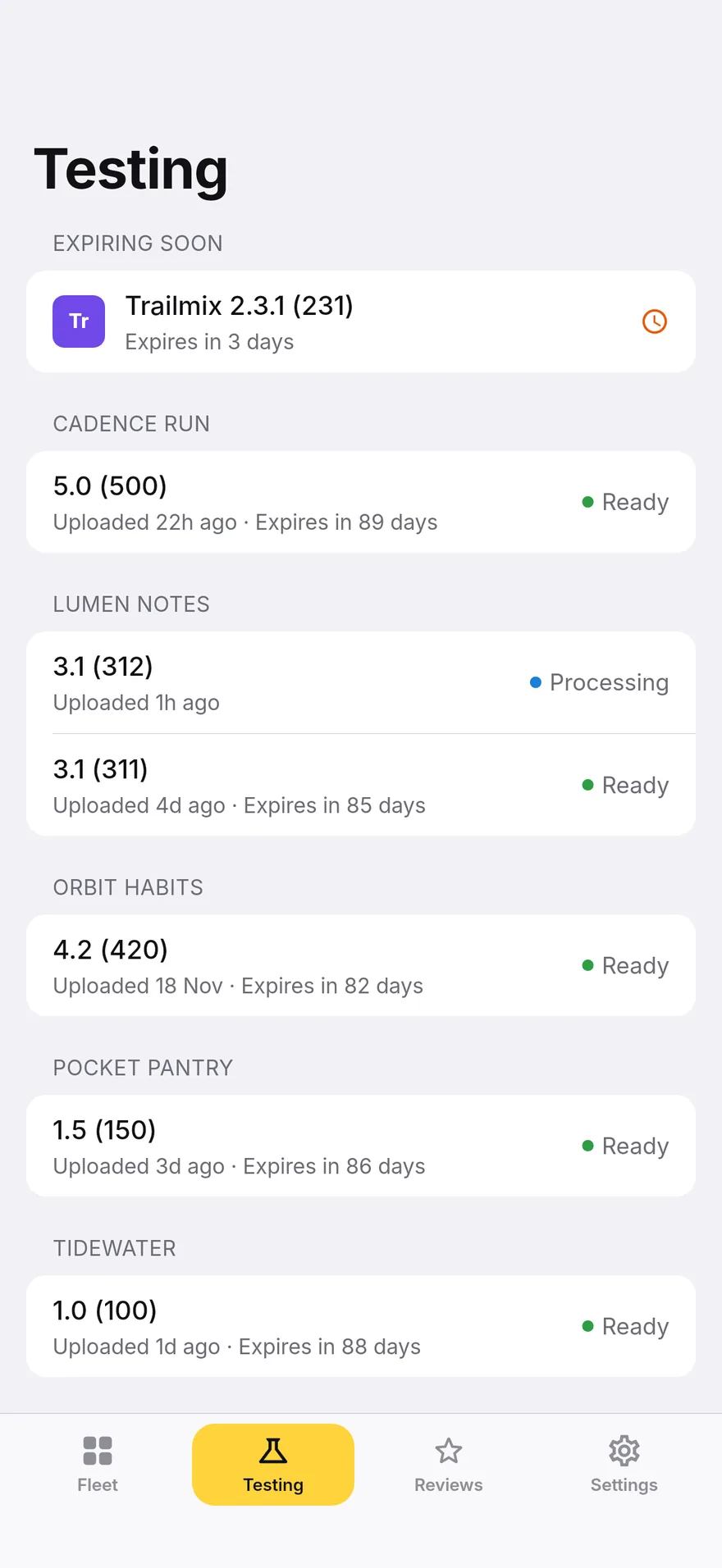
With one app, TestFlight's own pages are enough. With five, the easy thing to miss is which build each group is on and when it expires. Storemast's Testing tab lists builds from every app, newest first, with Processing, Ready, Failed and Expired states and the days left, and pulls builds with a week or less to go to the top. Managing testers and groups still happens in App Store Connect.
What about Android?
There's no TestFlight for Android. Google Play Console has its own testing tracks: internal testing for a small group, plus closed and open testing for larger betas. Storemast plans to support Google Play later; for now it's App Store Connect only.
Questions
What is TestFlight?
Apple's service for testing beta versions of apps for iPhone, iPad, Mac, Apple TV, Apple Watch and Apple Vision Pro before they're on the App Store. Developers upload builds to App Store Connect, and testers install them with the free TestFlight app.
How many testers can TestFlight have?
Apple documents up to 100 internal testers, who must be members of your App Store Connect team, and up to 10,000 external testers per app, invited by email or a public link.
Do TestFlight builds need App Review?
Builds for internal testers don't. Builds for external testers go through TestFlight App Review, usually for the first build of each version; later builds of the same version may not need a full review.
How long do TestFlight builds last?
90 days from upload. After that the build expires and testers can't install it. Upload a new build to keep testing.
Why didn't my tester get the TestFlight invitation?
Check the email address, their spam folder, and that the build is added to their group and has passed review if they're external. A public link avoids email problems: they open it on their device and accept.
How do testers send TestFlight feedback?
By taking a screenshot in your app and choosing Share Beta Feedback, or from the app's page in TestFlight. After a crash, TestFlight can ask them to share details. You see screenshots, comments and crashes in App Store Connect and in Xcode's Organizer.
Is there TestFlight for Android?
No. TestFlight is Apple-only. On Android, Google Play Console has internal, closed and open testing tracks for the same job.