 Storemast
Feature
Downloads, proceeds and crash rates for every app
After a release, two questions matter: are people getting it, and is it crashing? The Numbers tab answers both for every app, across both stores, on one screen.
What the Numbers tab shows
At the top, two totals: App Store downloads over the last 7 days across all your apps, and how many Android apps are over a vitals threshold. Below them, proceeds by currency.
Then one row per app for the last 7 days, an iOS app and its Android twin together:
- iOS: downloads, in-app purchases and proceeds in each currency, with a small trend line of downloads per day.
- Android: the user-perceived crash rate and ANR rate on the latest day, with a trend line of the crash rate. An app over Google's threshold is marked in red with the reason, such as Crash rate over Google's threshold.
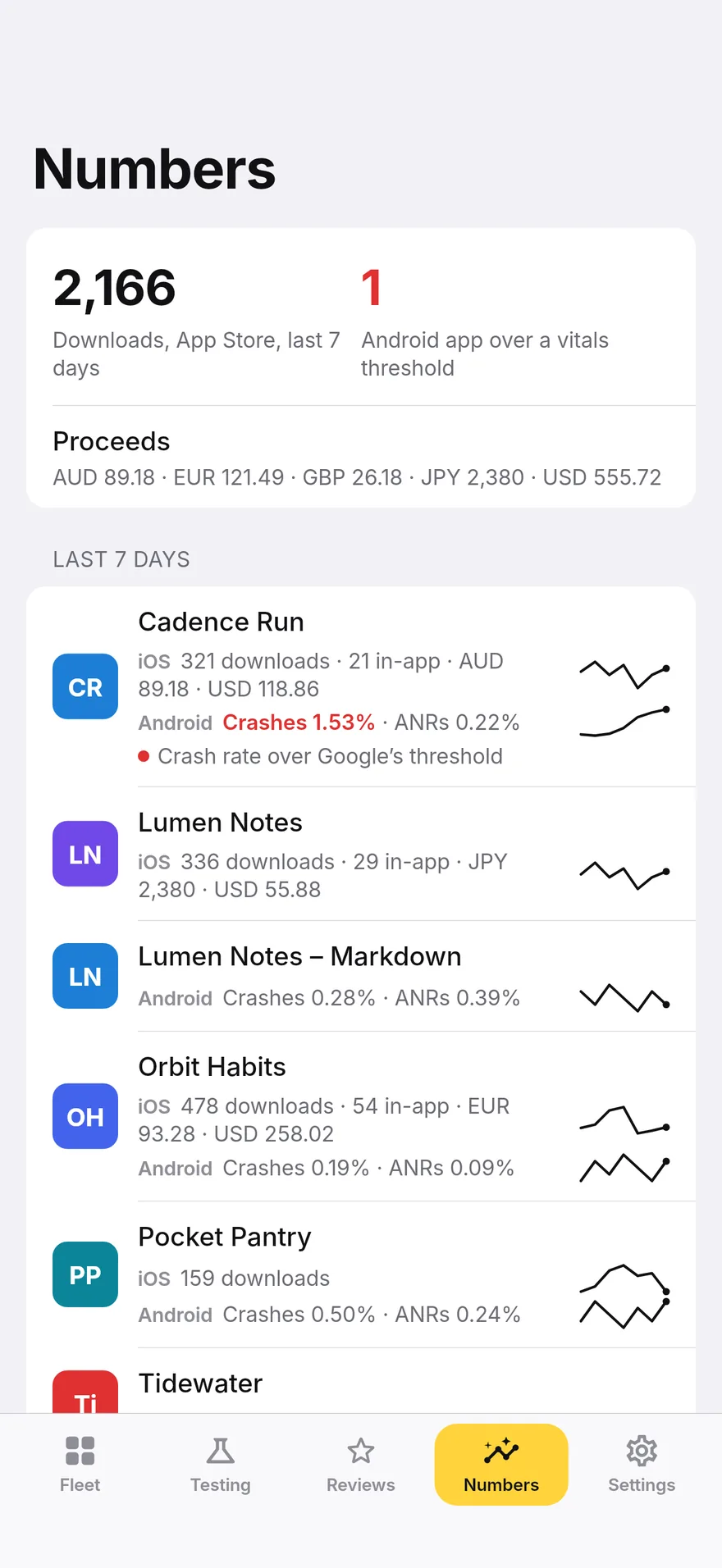
App Store: downloads and proceeds
Storemast reads Apple's Sales Reports through the App Store Connect API: the daily sales summary for each of the last 7 days. It's the same data App Store Connect's Sales and Trends uses.
- Find your vendor number in App Store Connect under Payments and Financial Reports, at the top left.
- Add it in Storemast on the App Store Connect connection screen. The Numbers tab offers a shortcut if it's missing.
- Check the key's role. Sales reports need a role that can see them, such as Finance or Sales. If Apple refuses, Storemast says the role is the reason.
Downloads are first-time downloads; updates and re-downloads aren't counted. In-app purchases map to their app through the app's SKU. Proceeds are shown in the currency Apple pays them in, so you may see several, and they aren't converted. Apple publishes a day's report the next day, and Storemast says how many of the 7 days have been reported so far.
Google Play: Android vitals
For Android apps, Storemast reads the user-perceived crash rate and user-perceived ANR rate (App Not Responding) from Google's Play Developer Reporting API, the same figures as Android vitals in Play Console.
Google treats an app as over its bad behaviour threshold at a user-perceived crash rate of 1.09% or an ANR rate of 0.47%, and says apps over a threshold can be less visible on Google Play. Storemast turns the app red when the latest day is at or over either number, so a staged rollout that's making things worse stands out. If it is, halt it from the app's screen: see staged rollouts on Google Play.
Vitals need the Play Developer Reporting API turned on in the Google Cloud project of your service account. Without it Storemast still works for releases, testing and reviews (apps are found from your App Store bundle IDs and packages you add in Settings), but the vitals column stays empty.
Why on the same screen
During a phased release or a staged rollout, you want downloads and stability side by side, for every app you ship. The Numbers tab puts them next to each other, and the rollout controls are one tap away in Fleet.
Limits to know
- Seven days only. For longer ranges, reports by country or Google Play installs and revenue, use App Store Connect and Play Console.
- No App Store crash rates: those aren't in the data Storemast reads.
- Numbers are as fresh as Apple's and Google's reports, which lag by a day or more; they aren't live.
- Looking at Numbers is free, with or without Storemast Pro.
Questions
Why don't I see App Store downloads?
Sales Reports are filed under your vendor number, so add it on the App Store Connect connection screen (it's at the top left of Payments and Financial Reports in App Store Connect). The key also needs a role that can read sales reports, such as Finance or Sales. Apple publishes each day's report the following day, so the newest day can be missing.
What counts as a download?
First-time downloads from Apple's daily sales summary. Updates and re-downloads aren't counted. In-app purchases are counted separately.
What are Google's bad behaviour thresholds?
Google Play flags apps whose user-perceived crash rate is at or above 1.09%, or whose user-perceived ANR rate is at or above 0.47%. Storemast marks an Android app red when its latest day is over either one.
Is the Numbers tab part of Pro?
No. Numbers is about looking, so it's free, like the rest of Storemast's screens. Pro unlocks the actions.